Finishot for Mac

From shutter to four agencies in 21.9 seconds

Finishot takes photos straight from your camera over Wi-Fi or cable, reads the players’ numbers and fills in names from your rosters. It builds a separate caption for each agency, and one press of Enter sends the photo to all of them at once. At a press conference, in parliament or at a concert it works the same way; you just pick names from your list of people.

The Free version never expires. Try Pro for 3 days, no card required.

NBA game, Cleveland Cavaliers vs. Los Angeles Lakers. Recorded in the real app.

How it works

One game with Finishot, from the night before to the last photo.

Set up the eventthe night before the game

Pick a work mode and enter the name, venue and date. Paste rosters from a link to the league’s site or load them from a file: numbers, names and kit colors come in all at once. For a press conference or a session of parliament, paste a list of people with their titles, straight from Excel if you like.
Connect the cameraonce per event

Enter the laptop’s address in the camera as its FTP server. From then on every photo lands in Finishot by itself; in the recording it took 2.5 seconds from the shutter.

The AI reads the photobefore you look at it

It reads the numbers on the jerseys and tells the teams apart by kit color. Names come only from your rosters, ordered left to right, each with a confidence score. If a number isn’t visible, the slot stays empty: type the number and press Enter.

Check the captionsone per agency

Each agency gets a caption built from its own template, in its own language. Jump between them with [ and ]. You only fix what the app couldn’t have known.

Approve with Enterand the next frame is up

The photo goes to every agency at once, each by its own route: FTP, SFTP or API. If the stadium network drops, the queue sends the backlog as soon as it’s back.

Where the caption comes from

Every agency has its own template in Finishot. Four sources fill it in, which is why one frame gets as many captions as you have agencies.

Agency 2 template{CITY}, {COUNTRY} - {date}: {people, left to right} {action} during the {competition} match between {home} and {away} at {venue} in {city}, {country}. (Credit Image: (c) {photographer}/{agency})

EventYou enter it once, before the game. Agencies abroad get the city and venue in their own language.

RosterNames from the numbers read off the jerseys or typed in by you.

AIWhat’s happening in the photo: a drive to the basket, a goal celebration, a foul, a speech at the podium.

AgencyLanguage, date format, word order, diacritics or none, and the credit line.

Agency 1 · in Polish2026.01.28 NBA, Cleveland Cavaliers - Los Angeles Lakers, Rocket Arena, Cleveland, USA. Na zdjęciu: Donovan Mitchell (L), De’Andre Hunter (C) i Luka Dončić (P) podczas akcji.

Agency 2 · in English, no diacriticsCLEVELAND, USA - January 28, 2026: Donovan Mitchell (L), De’Andre Hunter (C) and Luka Doncic (R) in action during the NBA match between Cleveland Cavaliers and Los Angeles Lakers at Rocket Arena in Cleveland, USA. (Credit Image: (c) Erik Drost/Agencja 2)

Keyboard

Shortcuts that are easy to remember

Keyboard shortcuts you already know, so you don’t have to think about them.

↵Approve, send, nextAlso from an empty person field. The next photo is on screen at once.
1–9Number directlyA digit opens the person picker with that number.
PSame as previousThe same people and caption as the previous frame.
[]Another agency’s captionPreview each agency’s template and language.
AAction phrase“fights for the ball”, “blocks”, with ready translations.
SSendSelected photos to every agency, through the queue.
⌥1–5Stars⌥6–9 color labels, T “to send”.
EOpen in editorLightroom, Photoshop and others.

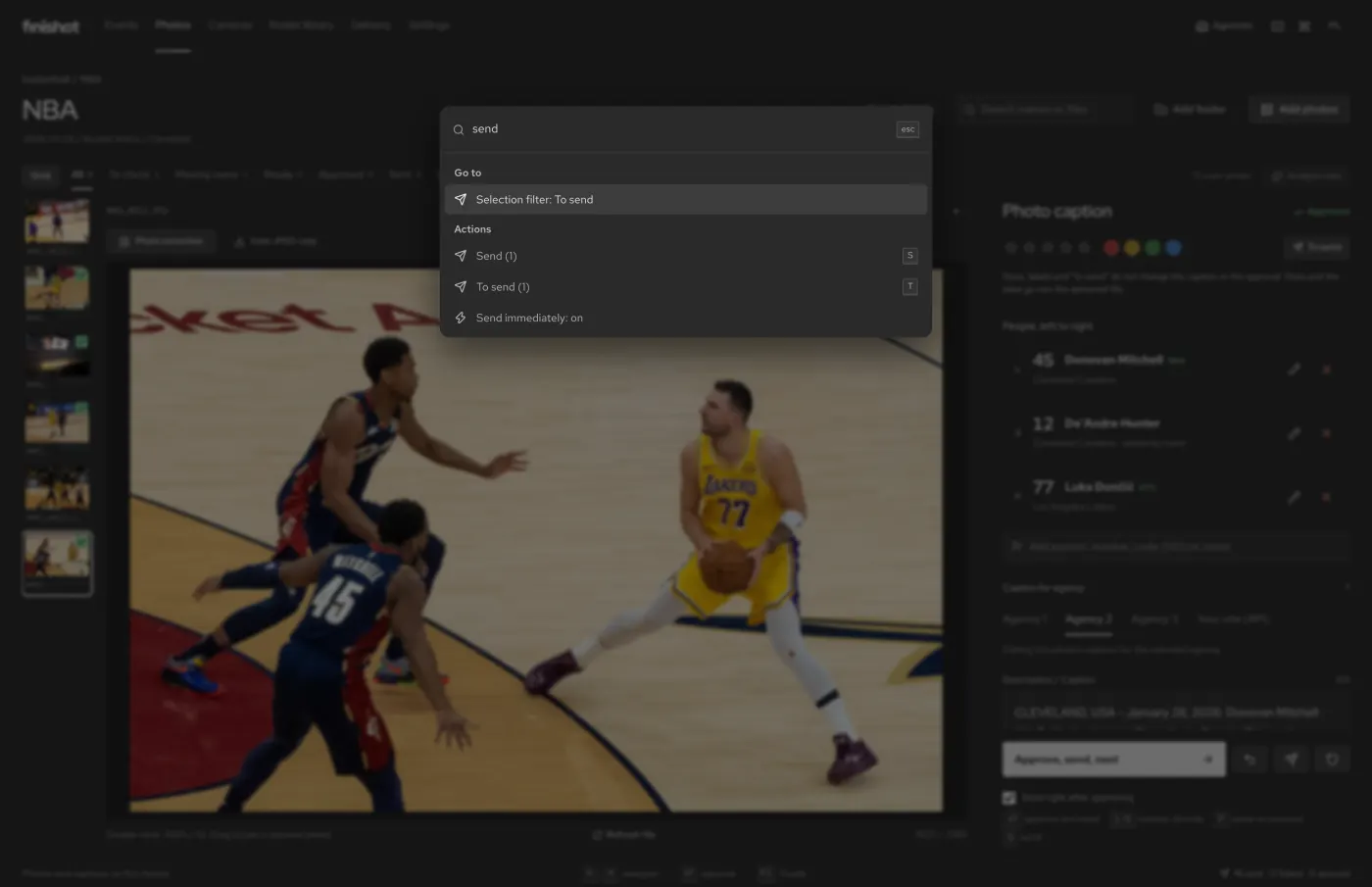
Forgot a shortcut? ⌘ K

The command palette knows every feature: send selected, load a roster from a link, replace a name in every caption of the game.

Finishot command palette with the word send typed in

Four work modes

You choose the mode for each event. It decides which fields the event has, what Finishot asks the AI and which phrases you get under the A key. Outside sports the AI doesn’t name anyone and doesn’t recognize faces, so you pick the person from your list with N.

Sports

Jersey numbers, rosters, competition, round and score.

…Donovan Mitchell (L), De’Andre Hunter (C) and Luka Doncic (R) in action.

Conference

Press conferences, galas, openings. Instead of a sport you enter the organizer.

…Minister of Health Katarzyna Lis speaks at the podium.

Politics

Sessions, votes, rallies. A list of people with their titles and parties.

…Speaker of the Sejm Tomasz Wierzbicki opens the session.

Concerts and culture

Concerts, theater, festivals, exhibitions, author talks.

…Singer Julia Maj performs on stage.

New event window with the work mode choice People list with titles and organizations for a Sejm session

People in the non-sports examples are made up.

Finishot, Photo Mechanic and Caption Caddie

Photo MechanicCaption CaddieFinishot
AI reads jersey numbersnoyesyes, names only from rosters
A separate caption for each agencymanual exportsone style at a timeall at once, with one Enter
Events outside sportsmanual templatesno, sports onlythree modes with a people list
Receives from the camera over FTPseparate appwatch folderyes
Delivery with a queueFTPFTP, FTPESFTP, SFTP, API
\h9\ codesyesimportyes
Pricefrom $149 a year$11.99 a monthfrom $0, Pro from $59 a year

As of November 2026, from the makers’ websites.

Pricing

The Free version has no time limit. A Pro license works on 5 devices, and if you change your mind within 7 days, you get a refund, no questions asked.

Free

0 zł0 €$0 forever

One agency, one event and two rosters. Enough for a real game.

Download free

Pro, yearly

199 zł49 €$59 a year

Unlimited agencies, events and rosters, every work mode, delivery over FTP, SFTP and API.

Try Pro for 3 days

Refunds within 7 days.

Pro, lifetime

499 zł149 €$169 one-time

Pro, paid once, updates included.

Buy a lifetime license

Prices include VAT. Payment and invoice through Lemon Squeezy. You pay the AI provider directly: with Gemini 3.8 Flash it comes to about €0.60 for 40 photos. A newsroom can buy licenses for its photographers; just get in touch. →

FAQ

Can the AI put the wrong name in a caption?

In sports the AI only reports the number, the kit color and how sure it is. The name always comes from the roster you loaded, and uncertain reads wait for you to confirm them. No photo goes to an agency without your approval.

What about outside sports? Does Finishot recognize faces?

No. At a conference, in politics or at a concert the AI only describes what’s happening in the photo. It doesn’t name anyone; you pick the person from your list with N.

Do my photos go to a Finishot server?

No. Files and captions stay on your Mac. For analysis a photo goes only to the AI provider you choose (Gemini, OpenAI or OpenRouter), on your own key.

How much does the AI cost?

You pay the provider directly; Finishot adds nothing on top. With Gemini 3.8 Flash it comes to about €0.60 for 40 photos.

Does it work offline?

Captions, rosters, codes and the queue work without a network. AI analysis and delivery wait until the connection is back, and Pro never switches off because you’re offline.

Will it replace Photo Mechanic?

For some photographers, yes. Others keep culling in Photo Mechanic and caption and deliver in Finishot. \h9\ codes work in both.

Where do rosters come from?

Paste a link to a league or club page, load an Excel or CSV file, paste a table or Photo Mechanic codes. Rosters stay in the library for the next games.

How many computers does a Pro license cover?

5 devices on one account. Free up a device in the app or in the Lemon Squeezy customer portal.

Can I get a refund?

Yes, within 7 days of purchase. And before you buy, you can try Pro free for 3 days.

When is the iPhone and iPad version coming?

I’m working on it. For now Finishot runs on Macs with Apple silicon and Intel.